
Introduction to the Viant Trafficking API
Overview
The Viant Trafficking API provides programmatic control over campaign setup and management. It enables you to create, configure, and launch campaigns via API, reducing reliance on manual UI workflows.
For support, contact your Viant Programmatic Account Strategist.
Use Cases
- Campaign tracking: Sync campaign metadata with your own systems to centralize reporting and monitoring.
- Streamlined campaign creation: Build templates or workflows that reduce the time required to set up new campaigns.
- Automated campaign management: Adjust budgets, pacing, or bids programmatically to maintain alignment with performance goals.
- Targeting management: Configure audiences (UI: Lines), apply PMP deals, site lists, and exchanges, or update targeting rules to maximize reach and efficiency.
Using Viant's Trafficking API
Endpoints
Production
Sandbox
https://sandbox-api.viantinc.com/
The test endpoint is a fully functional sandbox for development and integration testing. Note that it is redeployed weekly (Saturday night/Monday morning) and that no data will persist more than a day.
Warning
Test all changes in Sandbox (non-prod) before testing in production. All changes to production will go live immediately.
Authentication and Authorization
All taxonomy APIs use basic authentication over HTTPS. Viant will provide you with a username and password.
Return Codes
We return standard HTTP return codes: 200 series for success, 400 series for request errors, 500 series for server errors.
Message Format
All POST messages and return messages are encoded in JSON.
Response Body Format
Generally the response body consists of two parts: messages and entity.
Messages
Messages is an array of Message objects. A Message object has three fields: level, code, and message.
Level
Level is one of three values, to indicate the severity of the message: Info, Warning, or Error.
Code
Object Summary
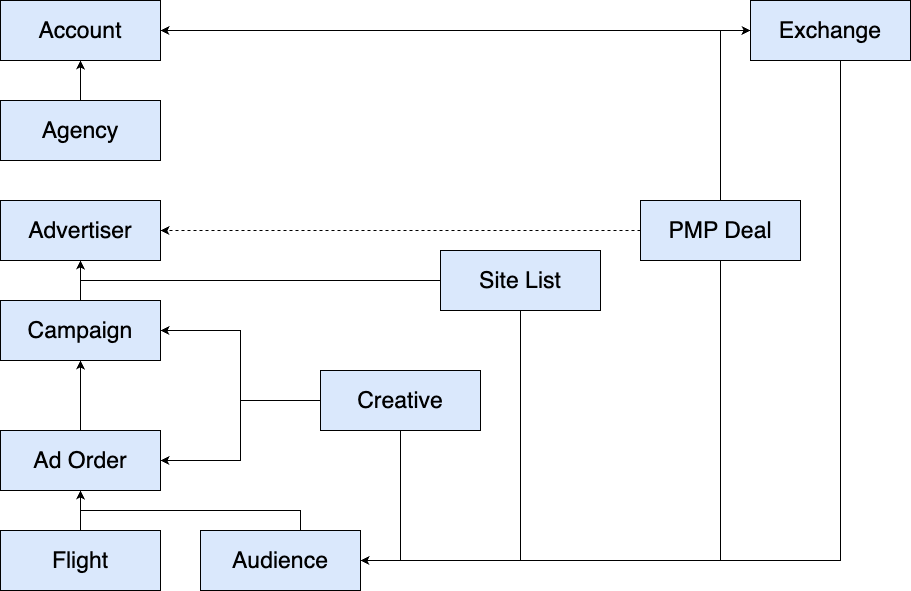
Hierarchy at a Glance
| Object | Represents | Key Notes |
|---|---|---|
| Account | Top-level client container | Parent of Agencies. |
| Agency | Sub-organization under an Account | Contains Advertisers. |
| Advertiser | A brand or advertiser entity | Owns Campaigns and Creatives. |
| Campaign | A media plan under an Advertiser | Consists of one or more tactics (Orders). Uses Campaign or Order Flights (not both). |
| Campaign Flight | Budget/pacing period at the campaign level | Only if campaign-level flighting is chosen. |
| Ad Order | A tactic within a campaign | Defines strategy, budget, pacing, and creatives. |
| Order Flight | Budget/pacing period at the order level | Only if order-level flighting is chosen. |
| Audience (UI: “Line”) | A targeting tactic within an order | Where specific targeting and targeting tactics are implemented within an Order. Multiple Audiences act as “OR.” |
| Creative | Ad asset | Can be attached to Campaigns, Orders, or Audiences. |
| Site List | A collection of domains or apps | Referenced from an Audience. |
| Exchange | Inventory source | Used directly or in PMP deals. |
| PMP Deal | Private marketplace deal | Configured from exchanges; advertiser- or account-wide. |
Account
The top-level client container. Each Account contains one or more Agencies.
Agency
A sub-organization under an Account. Agencies contain Advertisers and include properties such as contact information, address, and external IDs.
Advertiser
Represents a brand entity within an Agency. Advertisers own Campaigns and Creatives. Properties include category, currency, timezone, and external IDs.
Campaign
A Campaign corresponds to a media plan within an Advertiser. Campaigns may consist of one or more tactics (Ad Orders).
- Campaign setup defines media plan–level parameters such as start and end dates, lifetime budget, and frequency caps.
- Budget and pacing can be managed with Campaign Flights or at the Order level, but not both.
Campaign Flight
Represents a period of time with associated budgets and caps at the Campaign level.
- Allows one schedule to control multiple Orders.
- If not capped at the order level, budget may flow fluidly across Orders.
Ad Order
An Ad Order corresponds to a tactic or strategy within a Campaign. Multiple Orders can be created within a Campaign.
- Orders manage strategy-specific parameters, including start/end dates, budgets, optimization goals, CPM bids, and pacing.
- If campaign-level flighting is chosen, Orders do not have their own flights. If order-level flighting is chosen, each Order may have one or more Order Flights.
Order Flight
Represents a period of time with associated budgets and caps at the Order level.
- Supports unique pacing per tactic and optional budget rollover of unspent spend into subsequent flights.
Audience (UI: “Line”)
Terminology note
In the UI and internal KB we use Line. In the API, the equivalent object is called Audience.
Line (UI) = Audience (API).
An Audience represents the targeting tactic within an Order.
- Where specific targeting and targeting tactics are implemented.
- Multiple Audiences can be created within an Order. Within a single Audience, targeting criteria act as AND logic; across multiple Audiences, targeting acts as OR logic.
- Audience-level settings include targeting, frequency caps, max CPM bids, and weighting.
- Line weights determine budget allocation across Audiences. Line-level caps and bids operate independently from order and campaign caps, with the strictest always enforced.
Creative
A Creative is an ad asset (e.g., banner, video, audio, native, DOOH).
- Creatives live at the Advertiser level and can be associated with Campaigns, Orders, or Audiences.
- Supported formats include display, video, audio, native, and DOOH, each with format-specific properties such as size, duration, tracking, and landing page URLs.